USER002 — Login Issues & Troubleshooting Guide

Last updated: August 18, 2026

Learn how to resolve common sign-in problems on Xtrm, including forgotten passwords, two-factor authentication (2FA) issues, and locked accounts.

Overview

If you are experiencing difficulty logging into your Xtrm personal or company account, standard security measures or browser settings are usually the cause. Use this guide to quickly diagnose and fix sign-in issues.


Quick Troubleshooting Steps


1.Verify Your Credentials & Email Format:

Ensure you are entering the exact email address associated with your XTRM account. Check for common typos and ensure your Caps Lock key is off.


2.Reset Your Password:

If your credentials are not recognized, click Forgot Password? on the sign-in page. Enter your registered email address to receive a secure password reset link.
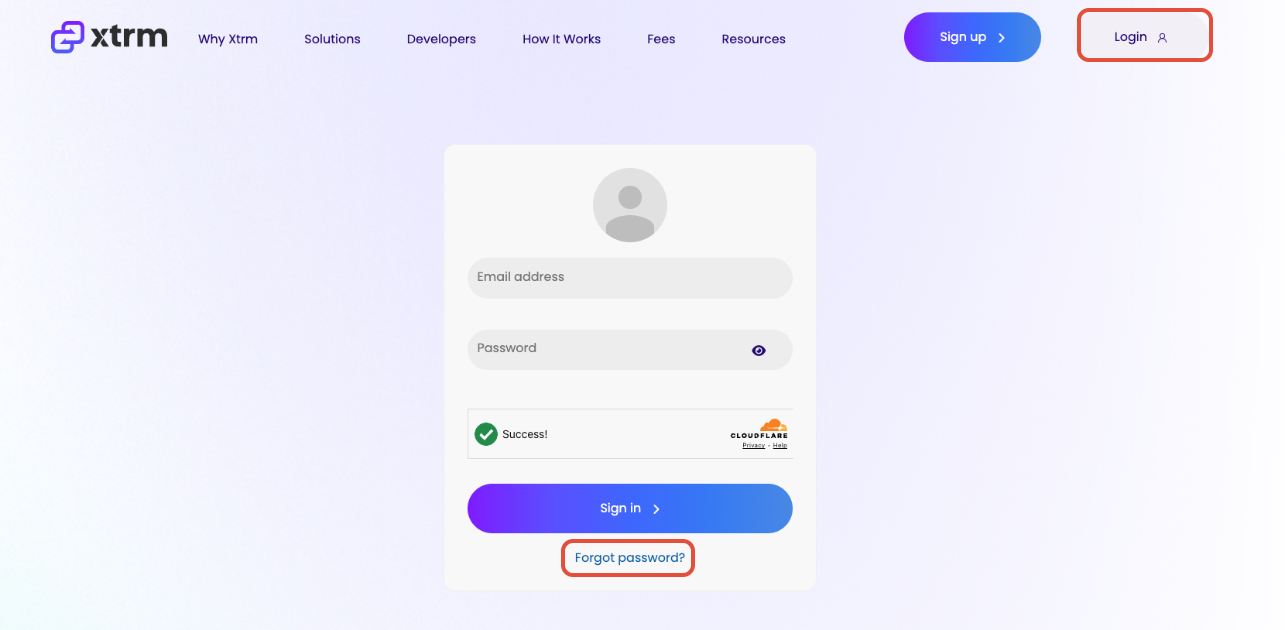


3.Check Two-Factor Authentication (2FA):

If prompted for an SMS verification code, ensure your mobile device has cellular service. If you changed your mobile phone number recently, you will need support assistance to update your 2FA profile.


4.Clear Cache or Try Incognito Mode:

Corrupted browser cookies or outdated cache can interfere with sign-in sessions. Open a new Incognito/Private window or clear your browser cache and cookies, then try logging in again.


Common Sign-In Issues & Solutions


IsseRoot CauseSolution
Password Reset Email Not Received

Spam filters or incorrect email entered

Check your Spam/Junk folder. Verify you entered the exact email address registered to your account.

Account Locked

Multiple failed login attempts

Accounts lock automatically after several consecutive incorrect password attempts to protect against unauthorized access. Wait 15–30 minutes before trying again or request a password reset.

2FA Code Not Arriving

Carrier delays or outdated phone number

Request a new code. If your phone number has changed, contact support@xtrm.com for identity verification and phone number updates.

Session Expired / White Screen

Outdated browser cache or cookie block

Clear your browser cookies/cache, disable ad-blockers for XTRM, or switch to an updated browser (such as Chrome, Edge, or Safari)


Still Need Assistance?

If you continue to experience login difficulties after attempting the steps above, please contact our support team at support@xtrm.com with the following details—

  • The email address registered to your account.

  • A brief description or screenshot of the error message displayed.