TAX002 — Tax Information for the USA
Last updated: September 1, 2026
If you reside in the USA, Xtrm makes available an online, downloadable 1099-K for individuals and a downloadable file for companies, listing all contributing transactions as of January 1 of the previous year. Submit these documents with your tax return in the usual manner — you don't need to submit any paperwork to Xtrm, such as an I-9 form.
Identity requirements
Individual accounts — Your Xtrm Identity must be at 100% complete IDL (Identity Level) to access and download the document. See Adding Personal Information to Your Profile.
We need to collect:
SSN/Tax ID
Physical address
Full name
DOB (date of birth)
Email
Mobile number
Company accounts — Your Xtrm Identity must be at 100% complete IDL (Identity Level) to access and download the document. See Understanding Identity Levels and Limits for Companies (IDL).
We need to collect:
Business Tax ID
Physical address
Full company name
Email
Money paid into a wallet is owned by the wallet account owner and is considered paid by the IRS regardless of whether it's subsequently transferred to a bank, a check, a gift card, or any other transfer option.
How will I receive a 1099-K, and what do I do with it?
Your 1099-K is displayed in your account for download at the beginning of the year — log in to retrieve it. It's a purely informational form summarizing your account's payment activity, designed to help you report your taxes. Make sure your profile is up to date, since the form is pre-filled using your profile data. We store your data securely and don't share it. Every year, the US IRS requires Xtrm to provide a completed 1099-K for each account.
Will I have to pay taxes for receiving money?
Yes. You're responsible for claiming all income and paying any resulting tax on funds received.
The IRS reporting threshold for Xtrm is $20,000 and 200 transactions for payments your account has received for goods and services within the calendar year. Xtrm provides a 1099-K to every person and company regardless of earnings, and directs them to the IRS. You can download your 1099-K in the Tax section of your account.
Before you submit: Make sure your Tax ID appears on the document. If it doesn't, update your Tax ID in the Identity section and download the document again.
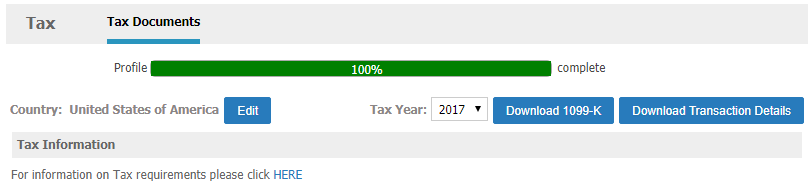
Example 1099-K
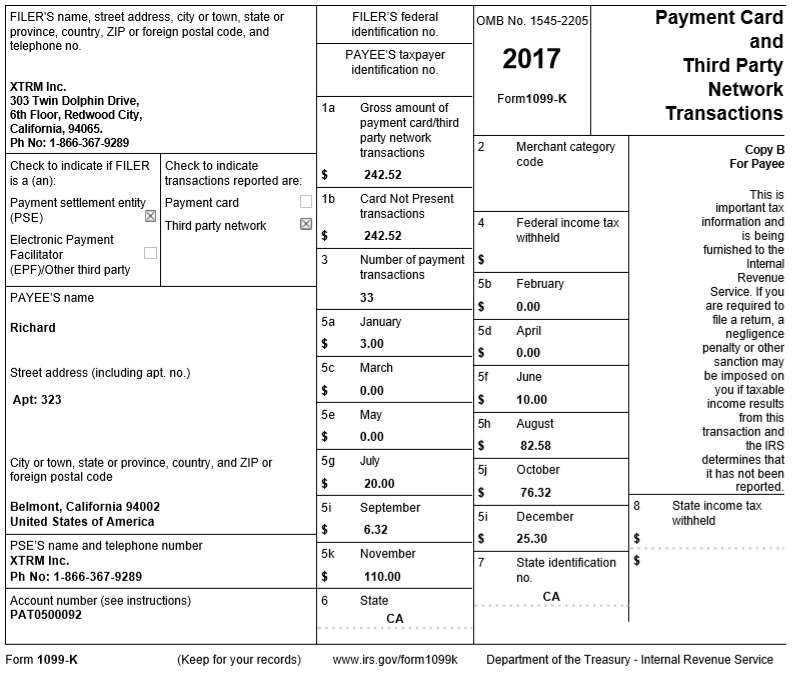
What information is included in my 1099-K?
Below is a brief description of what you'll find on the 1099-K Xtrm provides. For more help understanding your 1099-K, visit IRS.gov.
Label | Box # | Description |
|---|---|---|
Filer's name, address, and telephone number | Contact information for Xtrm | |
Payee's name, address, and telephone number | Contact information for your business or organization as provided to Xtrm. To update your address, do so before January 21st from your account settings. | |
PSE's name and telephone number | Contact information for Xtrm | |
Account number | Your Xtrm account number | |
Filer's federal identification number | Xtrm's identification with the government | |
Payee's taxpayer identification number | Your Employer Identification Number (EIN), Social Security Number (SSN), or Tax ID as provided to Xtrm. If it needs updating, correct it in your profile. | |
Gross amount of payment card third-party network transactions | 1a | Total gross volume of charges made with Xtrm in the calendar year |
Card Not Present transactions | 1b | Total gross volume of charges made without the card present at the time of transaction |
Merchant category code | 2 | The merchant category code for your business or organization |
Number of payment transactions | 3 | The number of charges made with Xtrm in the calendar year |
Federal income tax withheld | 4 | Backup withholding from your Xtrm payments |
Monthly gross volume | 5a–5l | Total gross volume of charges made with Xtrm for each month of the calendar year |
State | 6 | The state in which your income tax has been withheld |
State identification number | 7 | Your identification number used for state income tax withholding |
State income tax withheld | 8 | State and local income tax withheld from the payments |
How and when do I get my 1099-K?
Your 1099-K is available for download on January 1st and beyond each year, as long as your profile is complete. To view and download:
Click the Tax menu item on the left menu.
Click the Download 1099-K button.
What is "total gross volume"?
"Total gross volume" is the total of all payments you received for the year, including:
Payments from companies
All adjustments
Finding the transactions counted toward your 1099-K
To see a per-transaction breakdown of your 1099-K:
Log in to your Xtrm account and go to the Tax page.
Select the Download Transaction Details button in the upper-right corner.
Open the resulting .csv file in your spreadsheet viewer of choice.
My account received less than the IRS reporting threshold, but I still received a 1099-K. Why?
Xtrm provides a 1099-K to all USA residents regardless of the actual requirements and thresholds.
1099-MISC versus 1099-K
If you earn over $600, you may be sent a 1099-MISC as well as a 1099-K to submit with your tax return. You don't need to submit both.
Why do we require some personal information?
Your Social Security Number (part of your profile) is required by Xtrm for standard financial security, KYC, and AML purposes related to money movement and tax documentation. A completed profile is required to increase your transfer limits (daily/monthly) and to access tax documents. We recommend keeping your profile complete and reviewing your 1099-K regardless of the amount received.