COMPANY034 — How to Upload Custom Terms and Conditions
Last updated: August 26, 2026
Overview
Branded company pages on Xtrm can present custom Terms and Conditions (T&Cs) to their partners during the account sign-up process. This allows your organization to capture agreement to your own terms alongside Xtrm's standard terms.
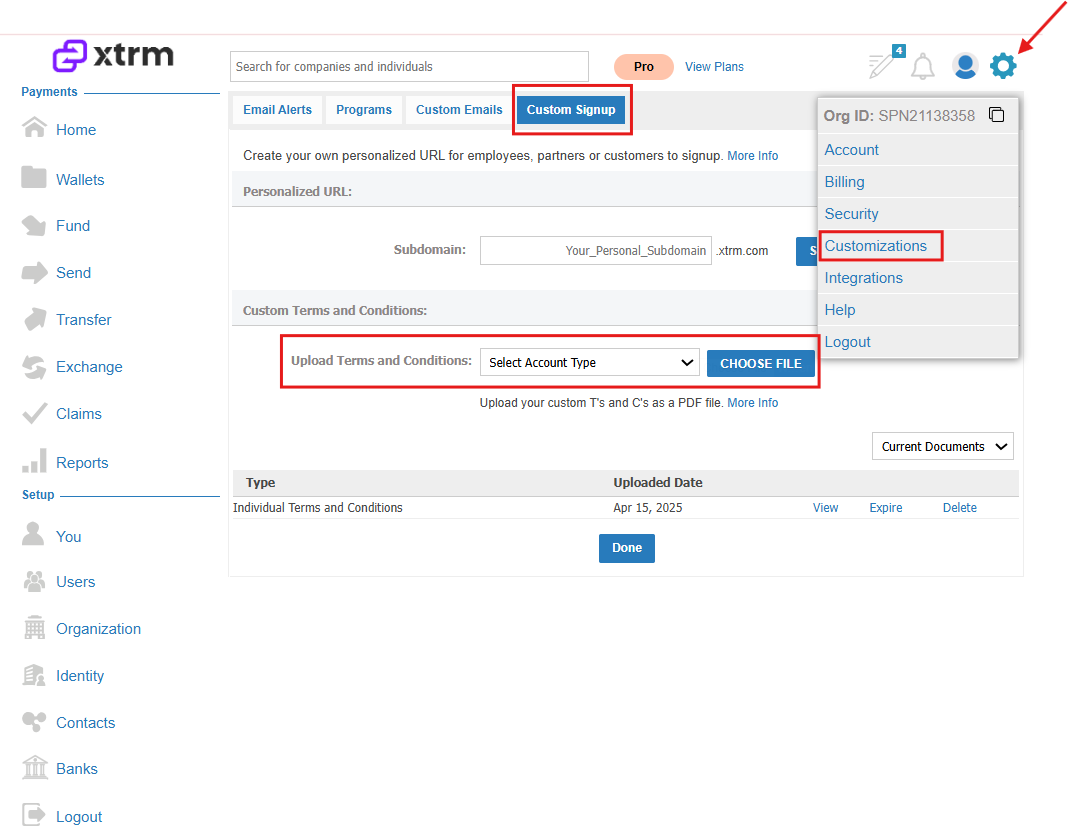
Navigate to your Branded Company Page.
Click the Settings icon.
From the menu, select Customizations.
In the Custom Terms and Conditions section, select the appropriate account type:
Company
Individual
Upload your custom Terms and Conditions document (PDF format recommended).
Click Done to apply the changes.
Once saved, any new partners signing up through your branded page will be prompted to review and accept both your custom Terms and Conditions and Xtrm's Terms as part of the account creation process.