COMPLIANCE002 — Understanding Identity levels and limits for personal accounts
Last updated: September 1, 2026
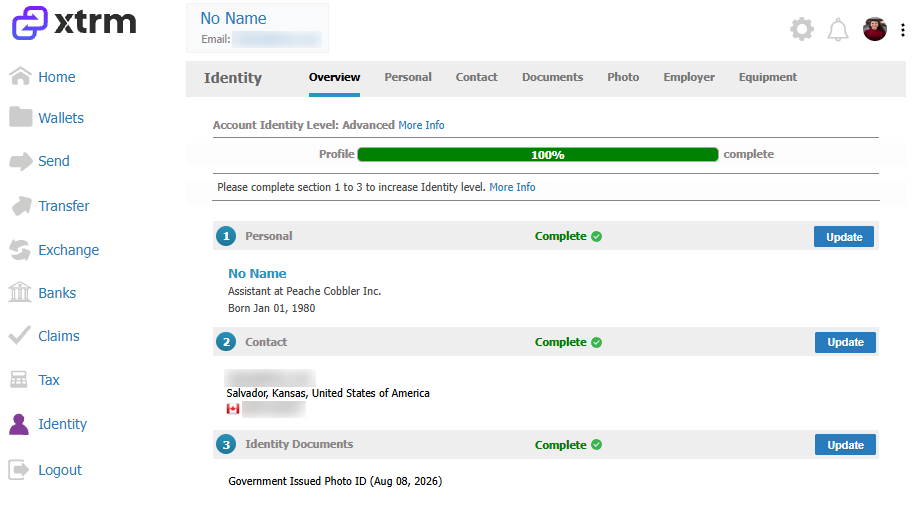
Xtrm accounts have 4 distinct identity levels. Your identity level is set by the completeness of your Identity profile. An increased Identity Level (IDL) increases your transfer limits — it does not affect your ability to receive payments into your wallet.
Identity levels
Identity level | Description | Profile completeness | Requirements |
|---|---|---|---|
Draft | Account creation initiated | 🔴 Red | Email address |
Basic | Increased transfer limits | 🔵 Blue | Draft + first and last name |
Standard | Increased transfer limits | 🟠 Orange | Basic + complete home address |
Advanced | Highest transfer limits | 🟢 Green | Standard + complete the "Identity" fields |
These icons are displayed in the Identity section of your account. Every identity field showing a green checkmark (completed) or a red X (missing data) contributes to your overall profile completeness.

How to increase your account identity level (IDL)
Go to the Identity section of your account and complete every field in the Personal and Contact sections that shows a red X.
Note: These are global banking requirements that all financial institutions must adhere to. We must collect an individual's information for anti-fraud purposes, as well as authorized-person and company information for company accounts. We fully understand, respect, and adhere to all global privacy regulations, and we don't share information, per our Privacy Policy.