COMPLIANCE011 — Understanding the Role of a Master Admin
Last updated: September 1, 2026
Xtrm is a global multi-tenant payment system. This means we have one organization profile for a company worldwide, with separate regional sub-account profiles for regional managers or regional legal entities (subsidiaries). This applies whether you're sending or receiving funds.
This structure provides global compliance and reporting while maintaining a secure separation of regional services and legal entities (subsidiaries).
There is only one master admin globally. This person is typically a signatory authority for the account. Be aware that the first person to register is automatically assigned the "master admin" role — it can always be changed later if required, but it's typically better to get it right the first time.
When deciding who should be the master admin for your company account, keep in mind that Xtrm is a financial service account regulated in the same way as a bank. We recommend choosing someone with financial signatory approval for your company — often someone in the executive team or finance group. This person isn't solely responsible for managing the account; they can delegate responsibility to regional sub-account controllers and managers (controller, manager, and standard users).
Master admin registration
One designated person, typically with signatory authority, is designated the master admin and should register the organization account with the company headquarters details — for example, "ACME Inc HQ" and its associated address (not "ACME Region 1" or "ACME Region 2"). If you're a company regional office, your organization account must be registered first. This can be done at xtrm.com by choosing company registration. If an organization account already exists, you'll be notified and asked to contact the existing users to be added as a user for your region.
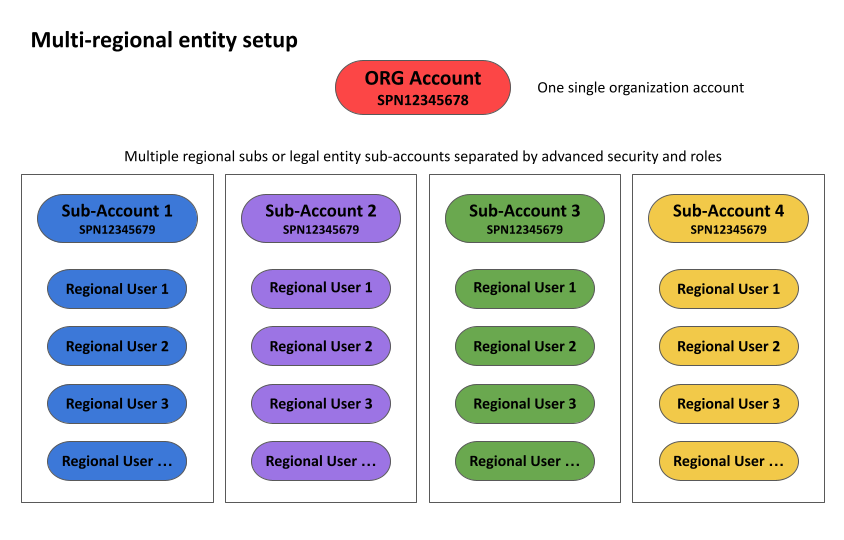
If you're a region or local legal entity (subsidiary), you can register your company HQ with your own email, but you may want to change the master admin at a later date.
Account roles and security handle the separation of access to wallets and funds. Regional offices can have specific access to regional wallets and functions — functionally identical to separate accounts from a compliance and security perspective, but with the benefit of global account management and reporting. This structure also simplifies onboarding times and ensures more accurate and faster payments, while keeping the right people limited to the right funds and services.
There's no limit to the number of controllers, managers, and standard users who can have secure access to the organization's account.
Restricted Master Admin
In some enterprise setups, it may be required that your designated master admin not have access to certain features and functions. To restrict their access, please contact us at compliance@xtrm.com, and we'll apply the restrictions required by your organization.
Key terms
Term | Description |
|---|---|
Organization account | Your global account worldwide. Has a unique Organization ID (SPN prefix + 7 numbers, e.g., SPN1234567). |
Master Admin | The key global administrator. There is one master admin per global account. |
Controller users | Multi-regional or entity administrators. Any number allowed. |
Manager users | Regional managers. Any number allowed. |
Standard users | Regional or program-specific users. Any number allowed. |
Wallets | Within an account, you can have as many currency wallets as you like. |