BANK001 — Why Was My Bank Transfer Returned?
Last updated: September 1, 2026
If your funds have been returned after a bank transfer, it's usually due to incorrect bank details. Below are common reasons and steps to resolve the issue. Make sure the bank details entered match the details on the bank account — if they don't, the transfer could be returned.
Common reasons for returned transfers
Incorrect bank details
Ensure your bank details are entered accurately. Even a small typo in the account number or bank code can cause the transfer to fail and be returned. Here's what you can do:
Log in to your account and double-check the bank details you provided.
Make sure the entered details match exactly with those on your bank account.
The name on the bank account must match the name you entered — if they don't align, the transfer could be rejected and returned.
USA-specific issues
If you see an error indicating the routing (ABA) number is incorrect, but it matches the one on your check, consider the following:
Wire transfers vs. ACH transfers. Banks often use a different routing number (ABA) for wire transfers than the one used for ACH transfers. Double-check which type of transfer you initiated and confirm the corresponding routing number:
Contact your bank for clarification.
Use online resources to verify the routing numbers for your bank.
Why did it take so long for the funds to be returned?
Banks process ACH and wire transfers through a clearing system. Here's how the process works:
If incorrect details are entered, the transfer is still sent but may be rejected by the receiving bank.
Once rejected, it can take the banks an additional 1 to 10+ business days to return the funds. Unfortunately, these timeframes are beyond our control.
Once the funds are returned, they're credited back to your wallet.
How to correct bank details
To avoid future issues, ensure your bank details are accurate before initiating another transfer:
Log in to your account.
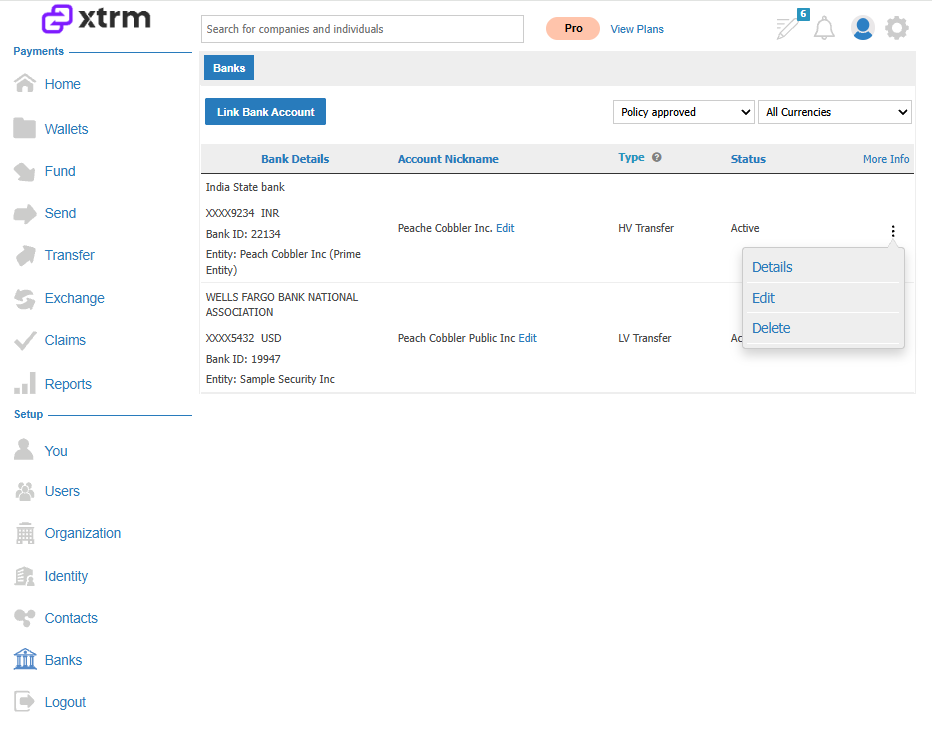
Navigate to the Banks section in the left-hand menu and select Linked Banks.
Use the ellipsis menu to delete the incorrect bank details.
Re-add your bank, carefully checking for typos or mismatches.
Following these steps helps prevent delays and ensures successful transfers.