SSO001 — Xtrm Single Sign-On (SSO)
Last updated: September 1, 2026
Xtrm is a service provider for single sign-on. An identity provider such as Okta is required as an identity provider (IdP). SAML is an XML standard used for communicating identities between two web applications. You can use it to let large teams access your support portal easily using single sign-on.
To use Xtrm SSO, log in to your company account and go to Integrations from the ellipsis (three dots) in the top-right corner of the screen. You'll see this screen to start the configuration.
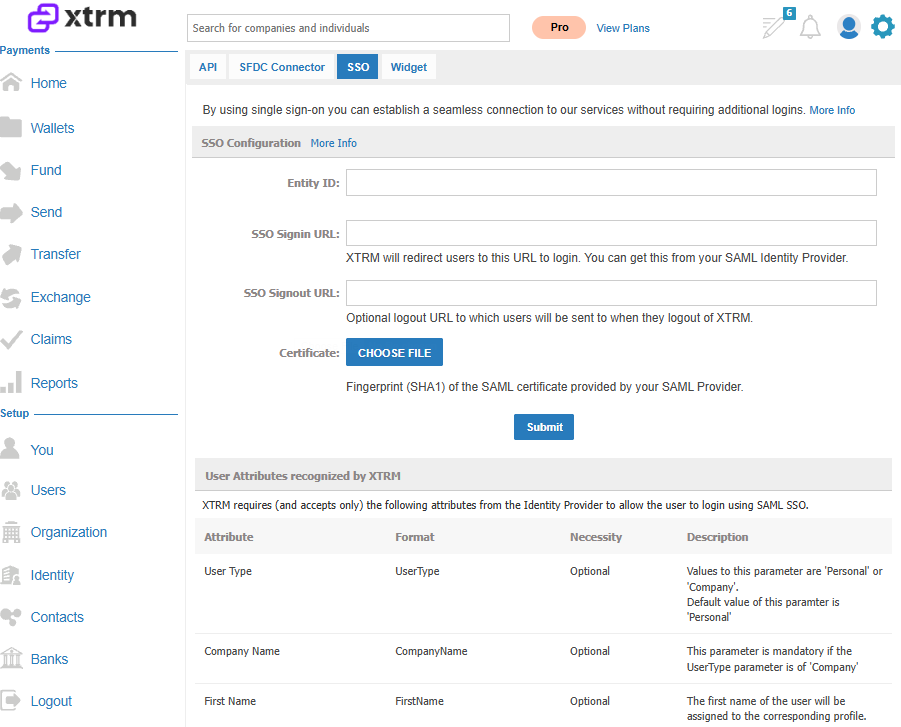
Using our single sign-on integration, you can avoid users signing in multiple times to view reward transactions and payout information. Single sign-on can be from various SAML products, such as Salesforce, Oracle, or your own home-built system.
Single sign-on to Xtrm generates one-time passwords for users, for security reasons, the first time they access Xtrm via a third-party portal or custom website. Once authenticated, that device's IP and browser type are stored with the user's profile.
Content
Xtrm Single Sign-On
Content
Introduction
Implementation
Single Sign-On
Identity Provider
Authentication Parameters
Auto-Create Optional Parameters
Introduction
Xtrm allows access to the Xtrm Portal by implementing a Single Sign-On (SSO) Service Provider (SP). Third-party integrators can connect their existing SSO Identity Provider (IdP) solutions with the Xtrm SP and allow users to access the Xtrm system seamlessly from the third-party system, without requiring re-entry or duplicate credentials. Since third-party SSO IdP implementations tend to differ across the industry, this document describes at a high level how the Xtrm SSO SP is implemented, and discusses the initial parameters and configurations required to start using SSO between the Xtrm system and the third-party integrator.
Implementation
Single Sign-On
SSO is a protocol that allows systems to exchange user authentication information securely. The systems are usually independent of each other but share a common interest for the user, so they agree to implement the SSO protocol to facilitate the login process when users need to switch between systems. In the case of Xtrm, most third-party users already have a set of credentials to access the third-party system and would otherwise need an extra set of credentials to access Xtrm. The SSO implementation lets users switch from the third-party system to creating and managing registrations within Xtrm without re-entering credentials. The SSO protocol defines the interaction between an IdP and an SP using the Security Assertion Markup Language (SAML) standard to exchange authentication information. The IdP provides the user credentials, and the SP trusts the user information passed by the IdP and agrees to provide access to its services or resources. In this implementation of SSO, Xtrm performs the role of the SP, accepting requests from configured and trusted IdPs.
Identity Provider
Integrators who plan to offer an SSO solution to their users to access Xtrm need to implement an IdP server. The IdP needs to exchange information with the Xtrm SP server using the SAML standard. As part of the attributes contained in the SAML payload, the Xtrm SP expects some specific parameters that define the authentication information used by Xtrm to allow the sign-on process.
Authentication parameters
Expected parameters when a new SSO request is received:
User Name — Email Address. The user name attribute needs to be a valid Xtrm user name. The IdP needs to map from their system's username to the username used in Xtrm (if it's not the same). Xtrm user names are typically the user's email address.
For SFDC SSO only:
Partner SFDC ID. Must match the Partner ID established in Xtrm when the partner was initially created in the Xtrm system.
Vendor SFDC System Org ID. Must match the Vendor Organization ID set up at configuration time in Xtrm, which uniquely identifies the calling integrator.
An example of these parameters in a Single Sign-On request would look like this:
UserName=jane.doe@example.com
Partner SFDC ID=001i000000SBrRg
Vendor SFDC System Org ID=00Di0000000h0Q9
All three parameters are validated during the SSO request authentication process and must match the information stored in Xtrm to grant access. That's why one of the key setup steps is exchanging the list of usernames, Partner IDs, and Organization IDs that will be used.
Auto-create optional parameters
Xtrm also supports the automatic creation of users, provided the SAML payload includes all 4 additional optional parameters. This provides an easy way to create individual beneficiaries without their employer having to create them manually in the Xtrm system to match what exists in the partner portal. Auto-creation is favored by larger customers whose payment beneficiary community is on the larger side.
First Name — the first name of the individual beneficiary.
Last Name — the last name of the individual beneficiary.
Email (used for username) — the email address of the individual beneficiary.
Phone — the phone number of the individual beneficiary.
An example of these optional parameters in a Single Sign-On request for SFDC would look like this (in addition to the 3 required parameters listed above):
FirstName=John
LastName=Doe
Email=john.doe@example.com
Phone=(123) 456-7890
Configuration
The final task in system-to-system integration involves configuring the SSO elements for communication. The following items need to be exchanged/set up for this to happen:
Third-Party SAML SSO URL — the sign-in URL for the third-party IdP. Xtrm needs this URL to add to its web configuration bindings. Example:
https://vendor.com/idp/loginThird-Party SAML SLO URL — the sign-out URL for the third-party IdP. Xtrm needs this URL to add to its web configuration bindings. Example:
https://vendor.com/idp/logoutThird-Party SAML Certificate — needs to be installed on the Xtrm SSO server to exchange SAML information with the third-party IdP.
Xtrm SAML Assertion URL — the sign-in/assertion URL for the Xtrm SP. The third-party integrator will need this URL to add to their web configuration bindings. Example:
https://sandbox.xtrm.com/web/common/sso/post.aspxXtrm SAML SLO URL — the sign-out URL for the Xtrm SP. The third-party integrator will need this URL to add to their web configuration bindings. Example:
https://sandbox.xtrm.com/web/common/sso/redirect.aspx
Xtrm Sandbox
Xtrm SAML Assertion URL: https://sandbox.xtrm.com/web/common/sso/post.aspx
Xtrm Production
Xtrm SAML Assertion URL: https://www.xtrm.com/web/common/sso/post.aspx