SFDC002 - Salesforce Integration via the SFDC Payment App
Last updated: September 1, 2026
The Xtrm SFDC Connector Payment Record — Version 1.4.0
Overview
This is the data object which enables Xtrm to make automated payments directly from Salesforce. You can create payment records in this object, and at intervals, Xtrm will fetch and process those records via the Salesforce API and update the payment status.
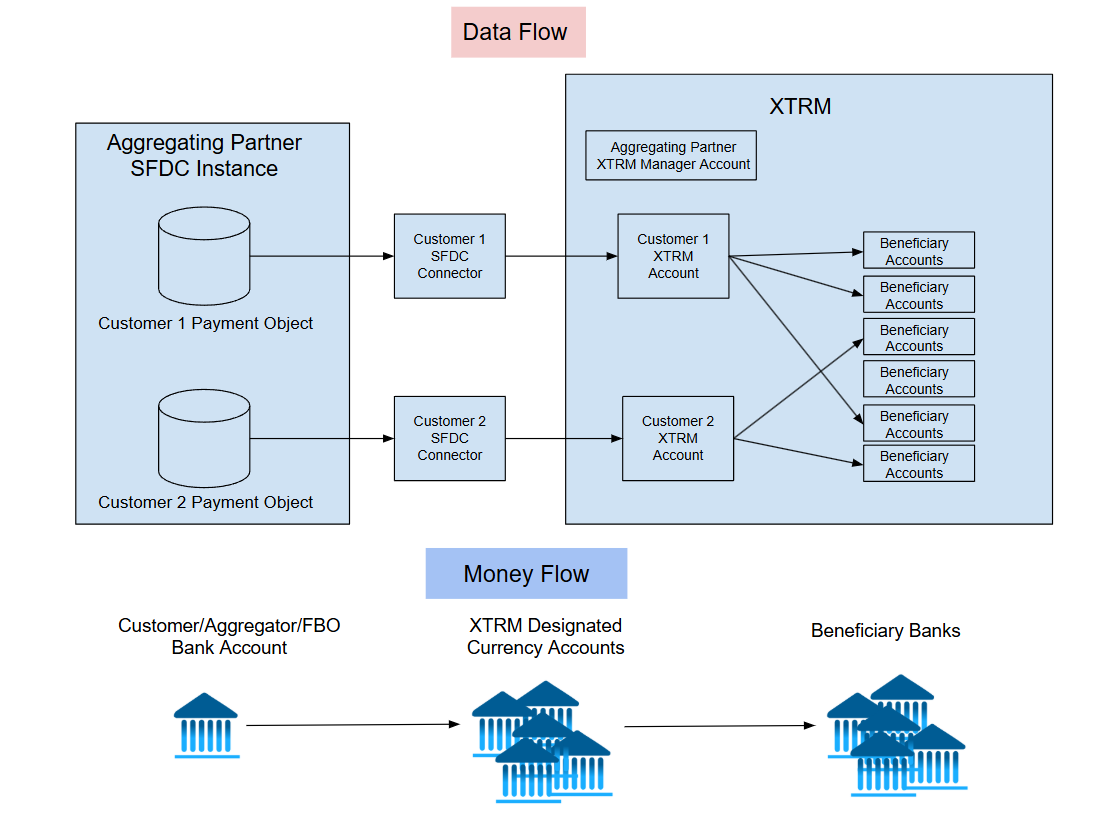
Expected Usage of this Object:
A company can create Xtrm payment records within their Salesforce instance and supply Xtrm with the credentials it needs to use the regular Salesforce API to read new (unprocessed) records at a set time interval (typically twice per day). Xtrm can then update the payment record transaction IDs, processed time, and payment status in the data fields reserved for Xtrm's usage.
Payment object design
Below are the 3 payment types, broken down into 3 tables. This is one object that can be used for all payment types using the same fields, by simply changing the value of "Payment Type."
Personal Payments
Field | SF object name | SF data type | Requirement | Description |
|---|---|---|---|---|
Payment Description |
| Text(255) | Mandatory | Description of the payment |
Currency Code |
| Text(3) | Mandatory | Three-letter currency code for the payment |
Remitter Wallet ID |
| Text(255) | Mandatory | Remitter's Xtrm Wallet ID from which to pull funds |
Payment Amount |
| Currency | Mandatory | Amount to pay to the beneficiary |
Payment Record ID |
| Text(255) | Mandatory | Payment Record ID for this transaction (unique to this record) |
Payment Type |
| Text(255) | Mandatory |
|
Processed Timestamp |
| Date/Time | Written back by Xtrm | Timestamp when processed by Xtrm. A processed record may or may not have been paid — check the Payment Status field for success or failure. |
Beneficiary Xtrm Transaction ID |
| Int | Written back by Xtrm | An Xtrm payment involves two transactions: one for the remitter and one for the beneficiary. On successful payment, the unique transaction ID for the beneficiary's wallet is recorded here. |
Remitter Xtrm Transaction ID |
| Int | Written back by Xtrm | The unique transaction ID for the remitter's wallet, recorded here on successful payment. |
Xtrm Payment Status |
| Text(255) | Written back by Xtrm | Xtrm payment status (Completed, Failed) — Xtrm use only |
Beneficiary Legal First Name |
| Text(255) | Mandatory | |
Beneficiary Legal Last Name |
| Text(255) | Mandatory | |
Beneficiary Email |
| Text(255) | Mandatory | |
Payment Program ID |
| Text(255) | Optional | Remitter Xtrm payment program ID |
Payment Failure Reason |
| Text(255) | Written back by Xtrm | Xtrm payment failure reason (Insufficient funds, Other) — Xtrm use only. Reset to null for Xtrm to re-process the payment. |
Company Payments
Field | SF object name | SF data type | Requirement | Description |
|---|---|---|---|---|
Payment Description |
| Text(255) | Mandatory | Description of the payment |
Currency Code |
| Text(3) | Mandatory | Three-letter currency code for the payment |
Remitter Wallet ID |
| Text(255) | Mandatory | Remitter's Xtrm Wallet ID from which to pull funds |
Payment Amount |
| Currency | Mandatory | Amount to pay the beneficiary |
Payment Record ID |
| Text(255) | Mandatory | Payment Record ID for this transaction (unique to this record) |
Payment Type |
| Text(255) | Mandatory |
|
Processed Timestamp |
| Date/Time | Written back by Xtrm | Timestamp when processed by Xtrm. A processed record may or may not have been paid — check the Payment Status field for success or failure. |
Beneficiary Xtrm Transaction ID |
| Int | Written back by Xtrm | The unique transaction ID for the beneficiary's wallet, recorded here on successful payment. |
Remitter Xtrm Transaction ID |
| Int | Written back by Xtrm | The unique transaction ID for the remitter's wallet, recorded here on successful payment. |
Xtrm Payment Status |
| Text(255) | Written back by Xtrm | Xtrm payment status (Completed, Failed) — Xtrm use only |
Beneficiary Company Contact Legal First Name |
| Text(255) | Mandatory | |
Beneficiary Company Contact Legal Last Name |
| Text(255) | Mandatory | |
Beneficiary Company Email |
| Text(255) | Mandatory | Email address of the master admin. The domain is validated. |
Beneficiary Company Name |
| Text(255) | Mandatory | Company name |
Beneficiary Organization ID |
| Text(255) | Optional | The Xtrm organization ID for the beneficiary. Optional, but if present, it's checked and validated. Format: |
Payment Program ID |
| Text(255) | Optional | Remitter Xtrm payment program ID |
Beneficiary Company Wallet ID |
| Int | Optional | Wallet IDs are unique, 3 to 10 digits. If not specified, the payment goes to the beneficiary's existing default wallet for that currency (each wallet holds a single currency); if none exists, one is created. Use this field to specify a particular wallet when the beneficiary has multiple wallets for a currency. |
Payment Failure Reason |
| Text(255) | Written back by Xtrm | Xtrm payment failure reason (Insufficient funds, Other) — Xtrm use only. Reset to null for Xtrm to re-process the payment. |
Employer Payments
Field | SF object name | SF data type | Requirement | Description |
|---|---|---|---|---|
Payment Description |
| Text(255) | Mandatory | Description of the payment |
Currency Code |
| Text(3) | Mandatory | Three-letter currency code for the payment |
Remitter Wallet ID |
| Text(255) | Mandatory | Remitter's Xtrm Wallet ID from which to pull funds |
Payment Amount |
| Currency | Mandatory | Amount to pay the beneficiary |
Payment Record ID |
| Text(255) | Mandatory | Payment Record ID for this transaction (unique to this record) |
Payment Type |
| Text(255) | Mandatory |
|
Processed Timestamp |
| Date/Time | Written back by Xtrm | Timestamp when processed by Xtrm. A processed record may or may not have been paid — check the Payment Status field for success or failure. |
Beneficiary Xtrm Transaction ID |
| Int | Written back by Xtrm | The unique transaction ID for the beneficiary's wallet, recorded here on successful payment. |
Remitter Xtrm Transaction ID |
| Int | Written back by Xtrm | The unique transaction ID for the remitter's wallet, recorded here on successful payment. |
Xtrm Payment Status |
| Text(255) | Written back by Xtrm | Xtrm payment status (Completed, Failed) — Xtrm use only |
Employer Company Contact Legal First Name |
| Text(255) | Mandatory | |
Employer Company Contact Legal Last Name |
| Text(255) | Mandatory | |
Employer Company Email |
| Text(255) | Mandatory | |
Employer Company Name |
| Text(255) | Mandatory | |
Beneficiary Legal First Name |
| Text(255) | Mandatory | |
Beneficiary Legal Last Name |
| Text(255) | Mandatory | |
Beneficiary Email |
| Text(255) | Mandatory | |
Payment Program ID |
| Text(255) | Optional | Remitter Xtrm payment program ID |
Employer Company Wallet ID |
| Int | Optional | Wallet IDs are unique, 3 to 10 digits. If not specified, the payment goes to the beneficiary's existing default wallet for that currency (each wallet holds a single currency); if none exists, one is created. Use this field to specify a particular wallet when the beneficiary has multiple wallets for a currency. |
Payment Failure Reason |
| Text(255) | Written back by Xtrm | Xtrm payment failure reason (Insufficient funds, Other) — Xtrm use only. Reset to null for Xtrm to re-process the payment. |
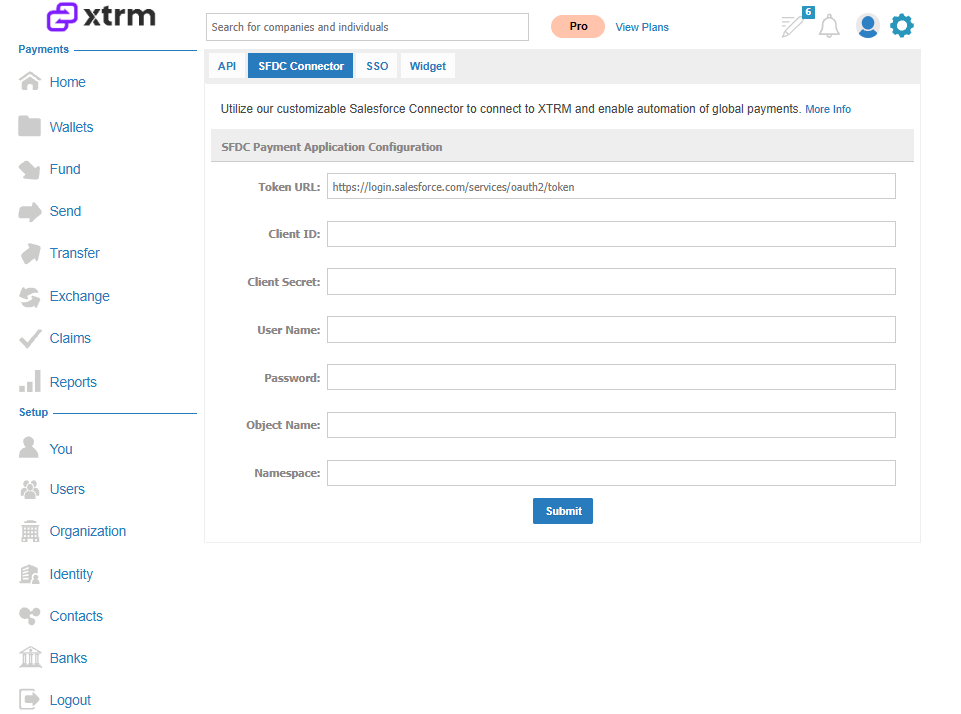
Xtrm SFDC Payment Application configuration
You'll need: Client ID, Client Secret, Username, Password, Object name, Namespace.
Client ID and Client Secret are part of the Connected App credentials. Create a Connected App to get these.
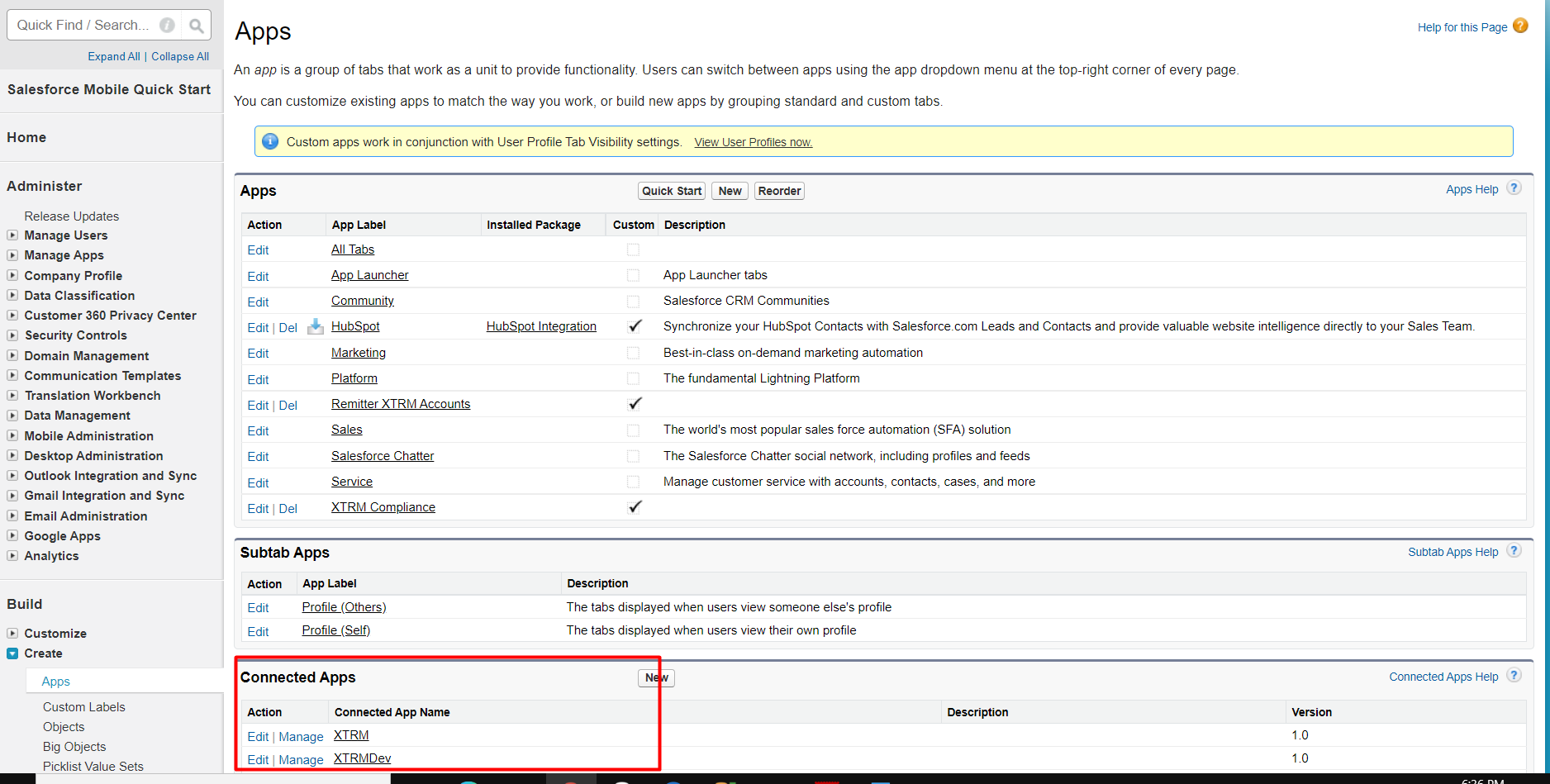
Click on one of the Connected Apps you created to see this.
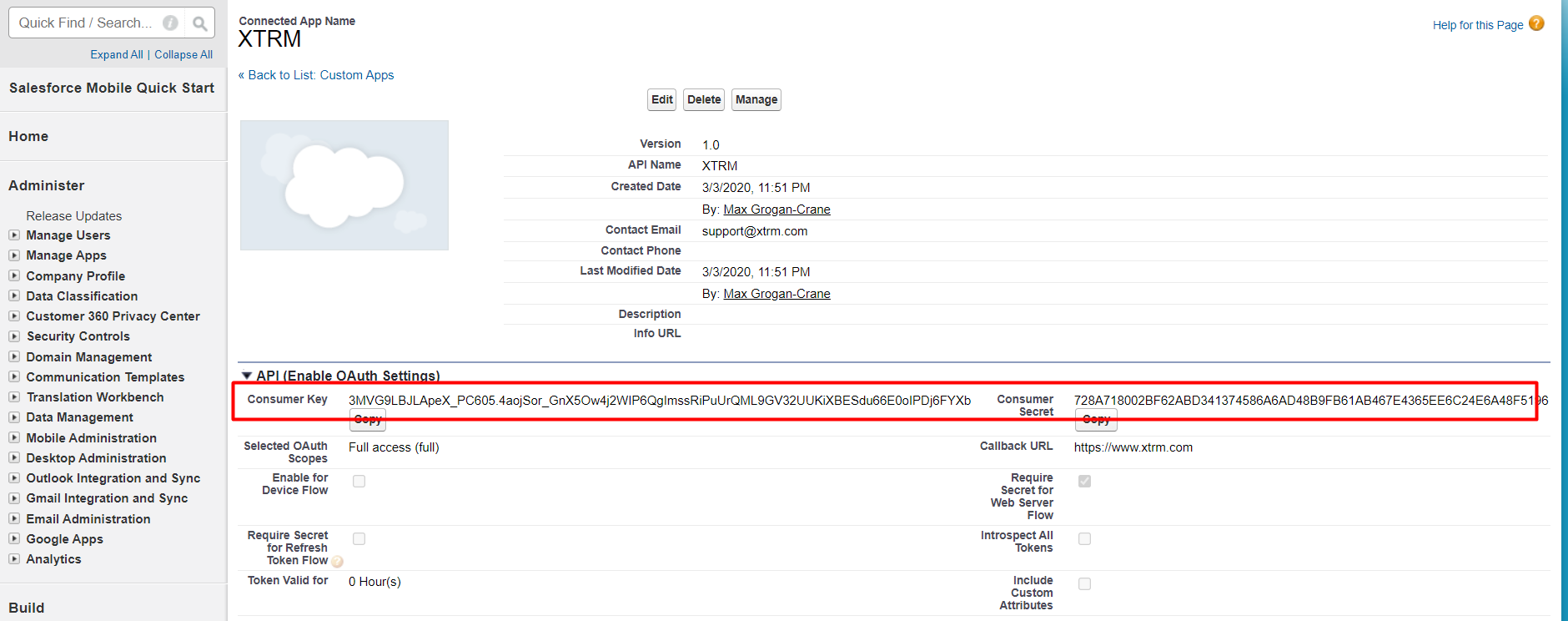
Username and Password are the Salesforce login credentials that have access to the Connected App you created.
Object name is the name of the payment object in your Salesforce environment.
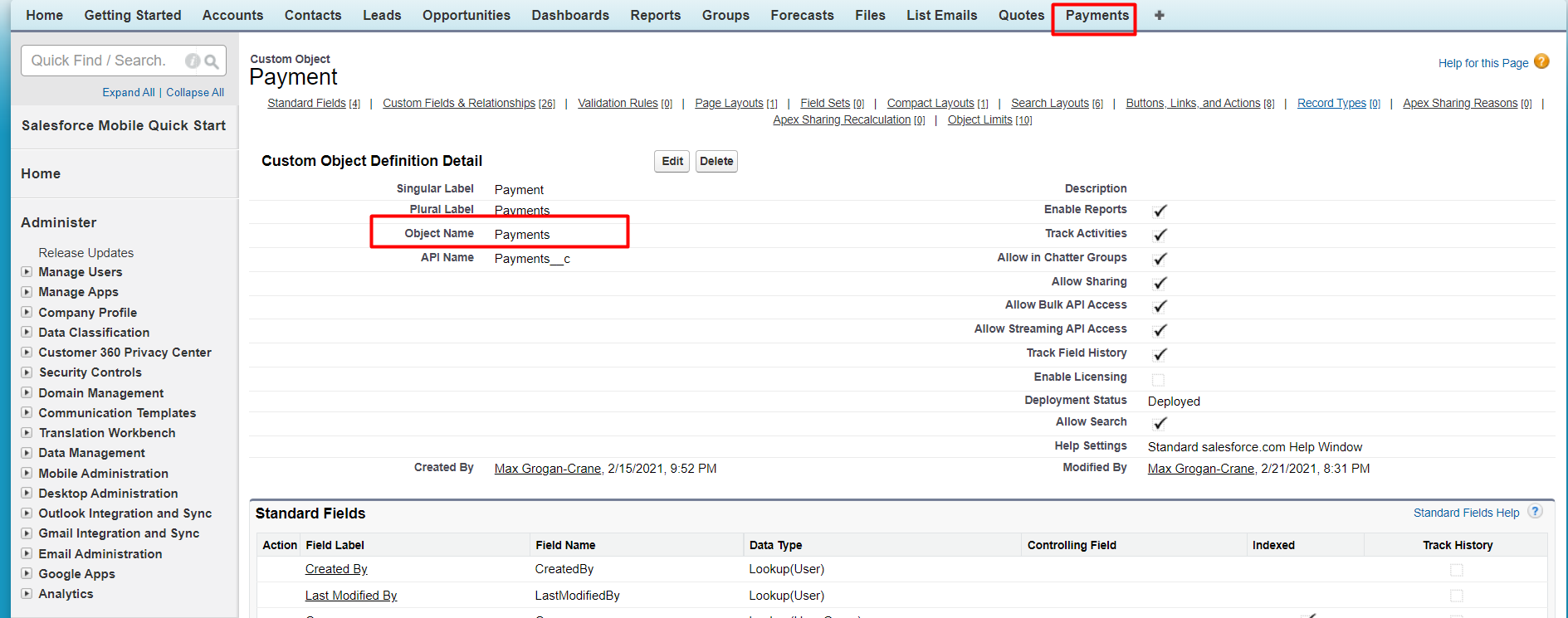
Namespace is something you would have created; all custom objects are prefixed with it. For example, if your namespace is set to YOURCO, the object name will look like YOURCO__Payment__c.
Write access permission required for these fields
processed_Time__cben_Transaction_ID__crem_Transaction_ID__cpayment_Status__cpayment_Failure_Reason__c